
Project management

AI project manager for freelancers and studios

Todo list and a project board. Simple when you need it. Powerful when you don't.

A todo list for today. A Kanban board for the bigger picture. Same workspace. You pick.

Todo List

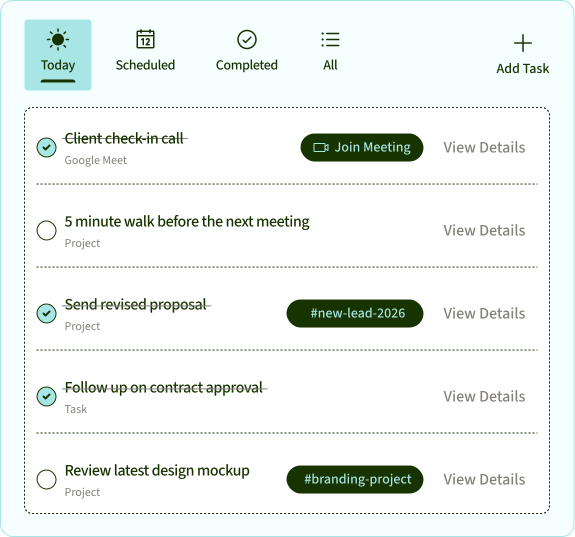
Today, sorted before you start.

Your tasks from projects, meetings, and everything in between. Already pulled together. Just show up.
Missed it? It didn't miss you.

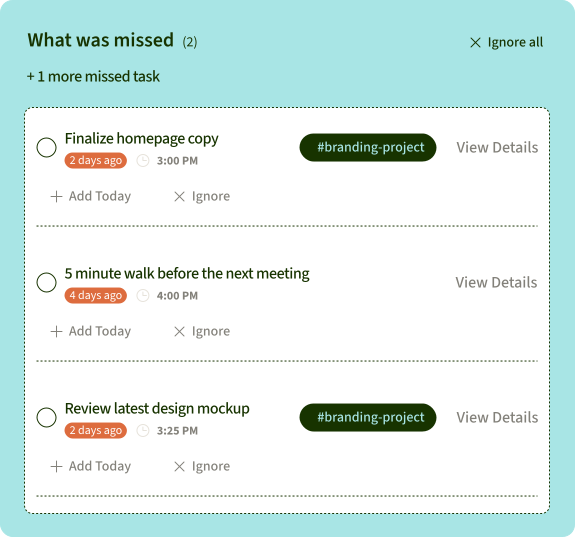
Tasks that slipped while you were heads-down, surfaced automatically. Add them today or let them go.
Kanban Board

Your project. One place.

Your tasks from projects, meetings, and everything in between. Already pulled together. Just show up.
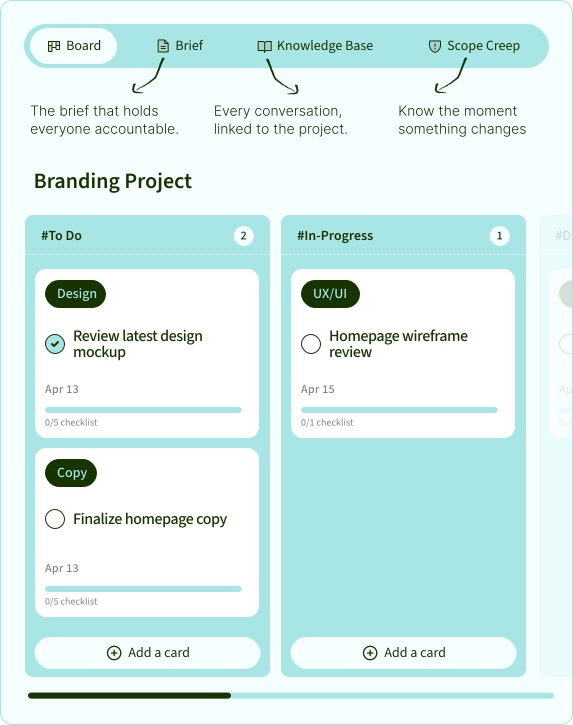
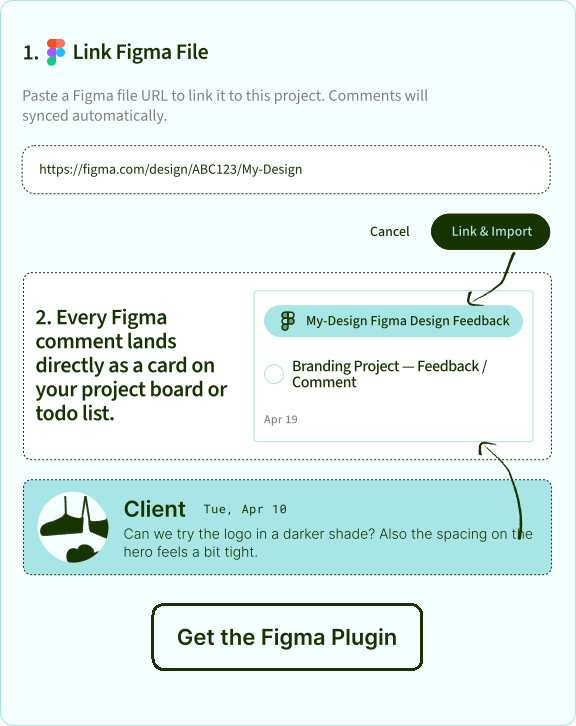
Figma lives here too.

Link your Figma file directly to the board. Every comment lands as a task on your project board and your todo list.
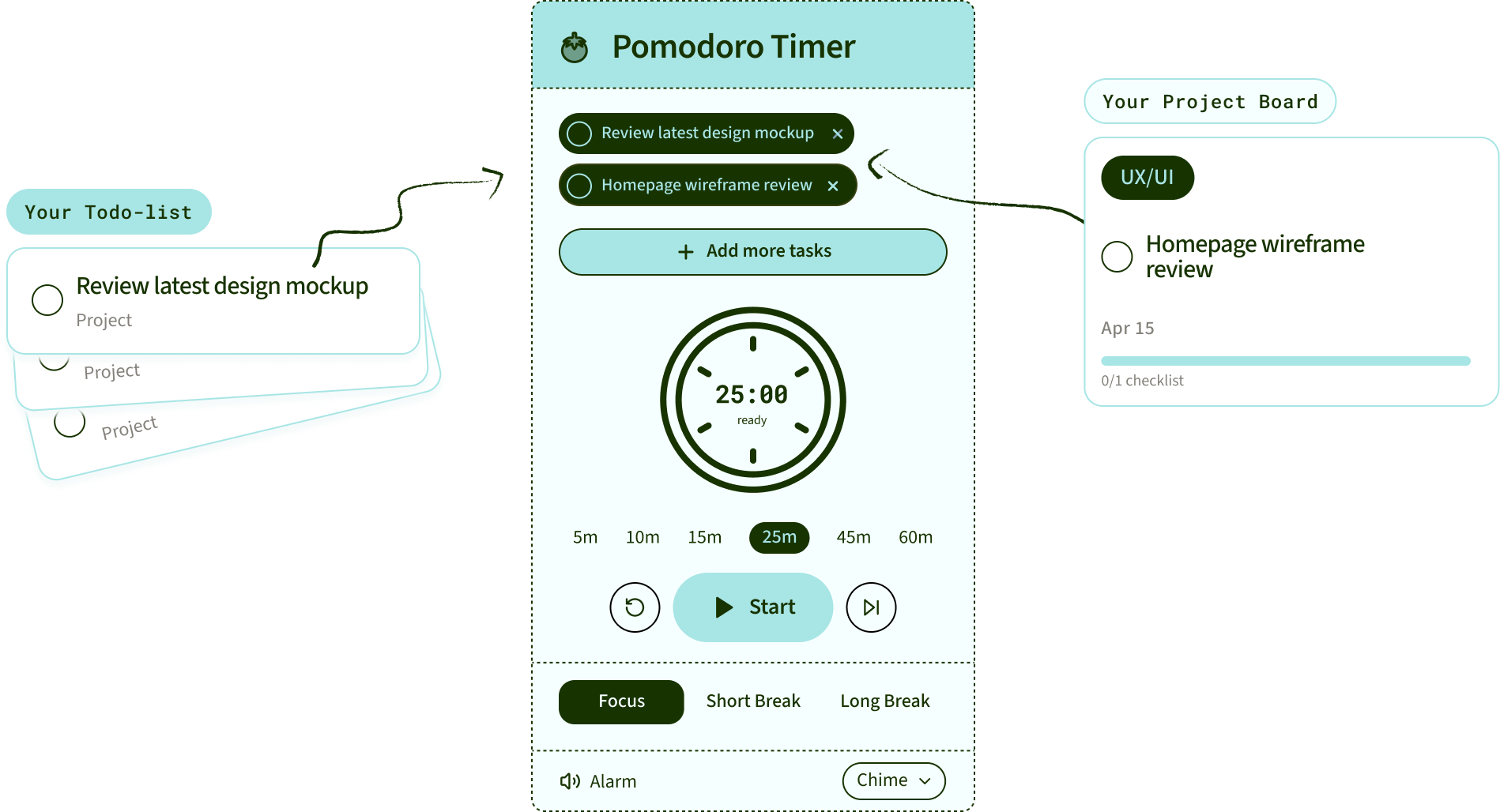
Pomodoro Timer

Built for brains that
need a deadline to start.

Set a timer for any task on your todo list or project board. Focus for 25 minutes. Take a break. Repeat. Get more done.

The project board that doesn't judge you
for leaving it to the last minute.

8 days a month. 96 days a year. All spent managing instead of doing.

That's 3 projects done. Or one really good sabbatical.

AI project management tools,
side by side.

← Scroll to compare →

Asana
ClickUp
Monday
Notion
SayBriefly

Kanban boards

Asana: Yes
ClickUp: Yes
Monday: Yes
Notion: Yes
SayBriefly: Yes

Tasks from your meetings

Asana:

custom setup

ClickUp:

paid add-on

Monday: Yes
Notion:

paid plans

SayBriefly:
Built in

Tasks from your email

Asana:

by forwarding

ClickUp:

by forwarding

Monday:

by forwarding

Notion: No
SayBriefly:
From Gmail

Figma comments become tasks

Asana: No
ClickUp: No
Monday:

via Zapier

Notion: No
SayBriefly: Yes

Built-in pomodoro timer

Asana: No
ClickUp:

time tracking only

Monday:

time tracking only

Notion: No
SayBriefly: Yes

Mac and Windows desktop app

Asana: Yes
ClickUp: Yes
Monday: Yes
Notion: Yes
SayBriefly: Yes

Flags client requests that aren't in the brief

Asana: No
ClickUp: No
Monday: No
Notion: No
SayBriefly:
Scope alerts

Checked September 2026 on each product's own website. Add-ons and integrations noted where a feature needs one.

Questions

What people ask about AI project managers.

What is an AI project manager?

+

An AI project manager is software that uses AI to keep a project up to date: it turns meetings, emails and feedback into tasks, keeps the board current, and flags what needs your attention. SayBriefly is an AI project manager for freelancers and studios that also warns you when a client asks for work outside the agreed brief.

Can AI replace a project manager?

+

No. AI is good at the admin: writing up calls, filing emails, creating cards and noticing changes. Decisions about clients, budgets and people still need a person. SayBriefly takes the admin so that person has time for the decisions.

How is AI used in project management?

+

The most useful places are meeting notes and next steps, turning client requests into tasks, keeping the board current, planning the day, and spotting scope creep by comparing new requests with the agreed brief.

How does SayBriefly catch scope creep?

+

Each project has a brief with its deliverables and what's not included. Once you lock it, SayBriefly checks client calls and emails against it and sends a scope alert with the client's exact words and the brief line the request goes beyond.

Where do the tasks on the board come from?

+

From the call notes and emails you pick when you set up a project, from Figma files and Slack channels you link to it, and from anything you or the assistant add. Client emails are matched to their project by sender.

Does it have a kanban board?

+

Yes. Every project has a kanban board with To Do, In Progress, In Review and Done columns that you can change, plus a list view. Cards have checklists, labels, due dates, assignees, comments, files and logged time.

Can I share a project with my client?

+

Yes. Invite a client or freelancer to a single project by email, or share a read-only link that opens without a login.

Does SayBriefly have Gantt charts?

+

No. SayBriefly is built around boards, briefs and to-do lists for client work. If you need Gantt charts and portfolio planning for large teams, a tool like Asana or Monday is a better fit.

Is there a desktop app for Mac and Windows?

+

Yes. SayBriefly runs on Mac (macOS 12 or later) and Windows 10 and 11, and in the browser at app.saybriefly.com, all in sync.

Do I need a separate project management tool?

+

Not for most freelancers and small studios. Project boards are included in SayBriefly together with the meeting notetaker, email sorting, to-do list and calendar.

It's 4pm on a Friday. The brief is locked, the client is happy, and Scribbble already sent the meeting recap. You close the laptop.


That's the point.

Get started
Studios and clients like you love us.
“SayBriefly allows me to give my full awareness in meetings, enabling radical presence, relevant question-asking, and finding flow that was otherwise elusive when note-taking.”

Emma Joel

Emma Joel, Creative Director

Itsmy Studio

“The AI summaries are incredibly accurate. Our entire team adopted SayBriefly within weeks, and our post-meeting clarity has never been better.”

Marcus Chen

Marcus Chen, Product Manager

Pixel Lab

“What used to take hours of note-taking and follow-up emails now happens automatically. SayBriefly is the assistant I didn't know I needed.”

Sarah Williams

Sarah Williams, Head of Design

Studio Bloom

Run the project.
Skip the admin.

Boards from your calls.
Tasks from your email.
Scope creep caught early.

SayBriefly

2026 ©SayBriefly. All rights reserved.
Designed by @HustleJar