
The scheduling app for people who serve clients
Every scheduling app puts a meeting on the calendar. SayBriefly also keeps what comes after: who they are, what was said on the call, and what is still open next time.
The short answer
A scheduling app lets people book time with you from a link, based on when you are free. SayBriefly does that, then carries the booking through: a form that screens people first, leads kept when they do not book, every booker saved as a contact, bot-free notes on the call, and "Since last call" on the next one. Mac and Windows.

The whole journey, in one app
Most scheduling apps stop when the slot is booked. The booking is where client work starts.
1Share one link
Send saybriefly.com/yourname. Clients pick a time without an account, in their own time zone.
2They pick a time, then fill your form
Your questions come after the time is chosen. Want to screen people first? Switch the link to gated and the form comes before the calendar.
3Nobody slips away
If someone fills the form and leaves without picking a time, they are kept as a lead in Bookings. You can schedule them yourself.
4They become a contact
Everyone who books or fills the form lands in Contacts on their own, with the booking in their history.
5Your time stays protected
Buffers before and after, a minimum notice, your approval if you want it. Busy times in Google Calendar block slots.
6Notes, with no bot
On Mac and Windows, SayBriefly writes the call note from your computer. No bot joins the call.
7The next call starts ahead
Book them again and the note shows Since last call: what is done, still open, asked again and changed.
What your clients see
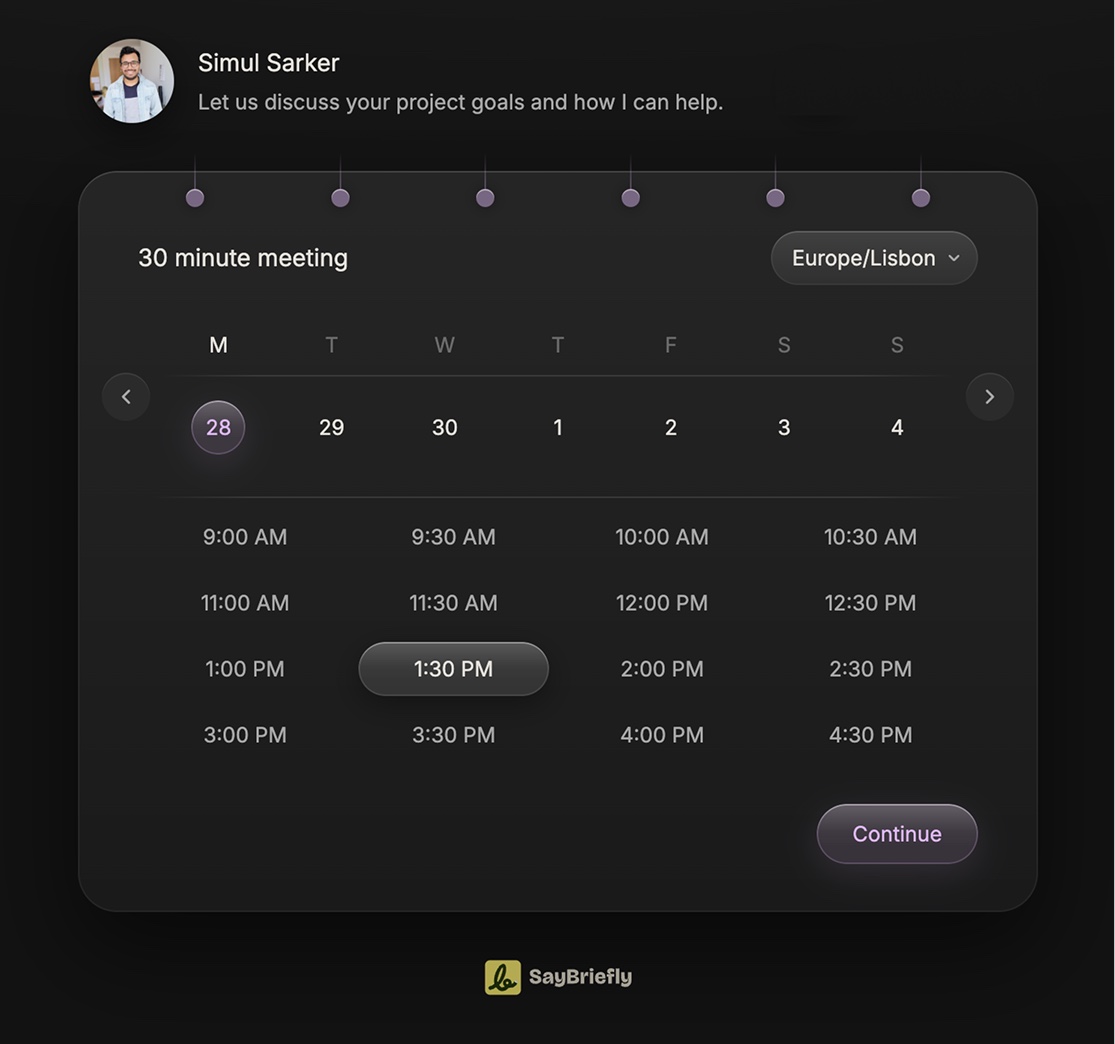
A real SayBriefly booking page: the meeting, a week strip to pick the day, the open times and a time zone switch.
Set each link your way

Length and hours
Each link has its own meeting length and the hours you are open.
Buffers
Free minutes before and after every meeting, set in 5 minute steps.

Minimum notice
No surprise bookings an hour from now. Pick how much warning you need.
Approval
Require your yes. The booker sees "Booking requested" until you accept.

Your own form
Build the questions. Put them before the calendar to screen, or after.
Their time zone
Times show in the booker's time zone, and they can switch it.
Each link also carries your photo, logo and colours.
Appointment scheduling software for small businesses and freelancers
Most scheduling software is built for one job: fill the calendar. That works for a salon or a clinic. If you run a studio, a consultancy or a solo practice, the appointment is only the start of the work. SayBriefly is online scheduling for people whose meetings serve clients: the booking app, the client list and the meeting notes in one place.
- Consultants and coaches: screen new clients with a form before they get a slot.
- Design and dev studios: every booked call lands in the client's project, next to their email and the brief.
- Agencies and account leads: recurring client calls become one thread, and each note starts with what changed.
- Freelancers: one meeting scheduler, one to-do list, no stack of separate tools.
What it does not do (yet)
- No payments. Clients cannot pay when they book.
- No round robin, no routing to teammates. A link books time with one person.
- No reminder emails to guests.
- Google Calendar only. No Outlook or iCloud calendar yet.
If you sell paid sessions or route leads across a sales team, pick Calendly or Cal.com. We compare them honestly in the best Calendly alternatives.
Where to go next
Calendly alternatives
Five scheduling apps compared on forms, leads and what happens after the call.
The calendar app
Google Calendar sync, booking links and notes on every booked call.
Calendar to-do list
Meetings and tasks with times on one day view.
Questions people ask
What is a scheduling app?
A scheduling app lets other people book time with you from a link, based on when you are free, so nobody has to trade emails to find a slot. Most connect to your calendar so a booked slot is blocked everywhere.
What is the best scheduling app for freelancers and small studios?
It depends on what happens after the booking. If you only need people to land on your calendar, Calendly, Cal.com or TidyCal do it well. If your meetings serve clients and you want the form, the lead, the contact, the call notes and the next call in one place, SayBriefly covers that whole path.
Can I screen people before they book?
Yes. Switch a SayBriefly booking link to the gated flow. Your form comes first, and the calendar only appears once the required answers are filled. You can also require your approval for every booking.
What happens if someone fills the form but does not book?
They are kept as a lead. You see them in Bookings and can schedule them yourself, and they are added to your Contacts.
Does SayBriefly work with Google Calendar?
Yes. Busy times in Google Calendar block your booking slots, and booked meetings land on your calendar. Google Calendar is the only calendar it connects to today.
Can I add buffers between meetings?
Yes. Each booking link has a buffer before and a buffer after, in 5 minute steps, plus a minimum notice so nobody books you at the last minute.
Can clients pay when they book?
No. SayBriefly booking links do not take payments. If you sell paid sessions, a tool like Calendly or Cal.com with payments built in is the better fit.
Does it route bookings to teammates or do round robin?
Not yet. A SayBriefly booking link books time with one person. There is no round robin and no routing to teammates.
What is the difference between a scheduling app and scheduling software?
Nothing important. People say scheduling app, scheduler app, scheduling software or appointment scheduling software for the same thing: a tool that lets others book time with you online. SayBriefly is a desktop app with a booking page that works in any browser.
Is SayBriefly good appointment scheduling software for a small business?
For a small business whose appointments are client meetings, yes: booking links, a screening form, leads, contacts and call notes in one app. For walk-in style businesses that need payments, deposits or staff rotas, a dedicated booking system is a better fit.
Is there a scheduler app for iPhone or Android?
SayBriefly runs on Mac and Windows, with a browser extension. There is no iPhone or Android app. Your clients book from any phone browser, no app needed.

It's 4pm on a Friday. The brief is locked, the client is happy, and Scribbble already sent the meeting recap. You close the laptop.
That's the point.

“SayBriefly allows me to give my full awareness in meetings, enabling radical presence, relevant question-asking, and finding flow that was otherwise elusive when note-taking.”

Emma Joel, Creative Director
Itsmy Studio
“The AI summaries are incredibly accurate. Our entire team adopted SayBriefly within weeks, and our post-meeting clarity has never been better.”

Marcus Chen, Product Manager
Pixel Lab
“What used to take hours of note-taking and follow-up emails now happens automatically. SayBriefly is the assistant I didn't know I needed.”

Sarah Williams, Head of Design
Studio Bloom

From the first click
to the tenth call.
Forms, leads, contacts,
bot-free notes and memory,
in one app.



2026 ©SayBriefly. All rights reserved.
Designed by @HustleJar